The False Dilemma: Speed vs. Consistency
When evaluating automation for a lathe or a machining center, shop owners often focus on the wrong metric: Speed. In many cases, a highly motivated human operator is actually "faster" at loading and clamping a single part than a collaborative robot. The true advantage of automated machine tending lies in Consistency and the elimination of the "Unpaid Hours."
The "Unpaid" Hours
An 8-hour staffed shift rarely translates into 8 full hours of spindle runtime.
- Manual Cell: Runtime is affected by breaks, handoffs, and task switching.
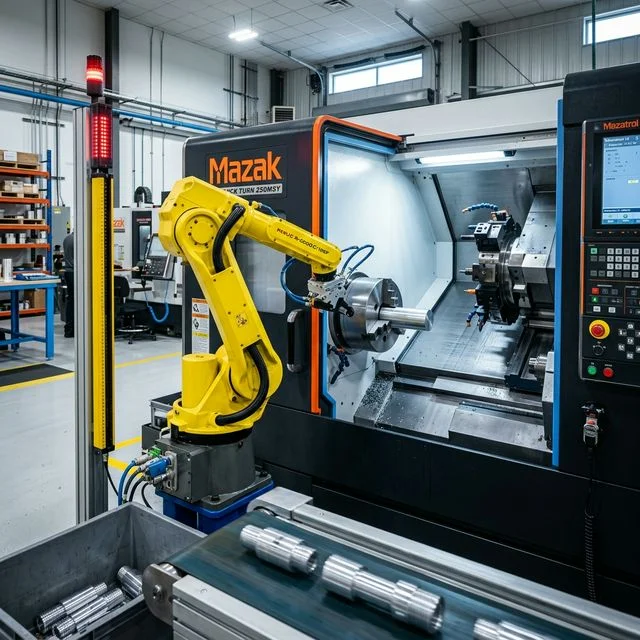
- Robot Cell: Runtime can be extended when part presentation, chip control, and alarm recovery are stable.
| Cost Factor | Manual Operator | Robot Cell |
|---|---|---|
| Upfront Acquisition Cost | Hiring and onboarding cost profile | Cell integration, EOAT, guarding, and commissioning |
| Hourly Rate (Burdened) | Wages, taxes, benefits, and supervisory overhead | Power, maintenance, and support coverage |
| Annual Cost (Single Shift) | Depends on staffing model and turnover | Depends on financing, uptime, and utilization plan |
| Total 5-Year Cost | Scenario output | Scenario output |
The 3 Layers of Automation ROI
When justifying a $100k robot cell, most manufacturing engineers stop calculating at "Labor Savings". This is a fundamental mistake that leaves the best justification arguments on the table. The true Return on Investment comes from three distinct, stacking layers.
Layer 1: Labor Reallocation (The Baseline)
Formula: (Operator Hourly Rate × Hours Automated) - Robot Running Costs
This is the baseline layer. The goal is usually labor reallocation to higher-value tasks (setup, quality, programming), not simple headcount subtraction.
Layer 2: Utilization Increase (The Eliminator of Waste)
Formula: (Extra Recovered Spindle Hours × CNC Machine Hourly Rate)
This layer captures recovered machine time inside staffed shifts. Use measured pre/post run-state data rather than assumed percentages when claiming utilization gain.
Layer 3: Unattended Hours (The Multiplier)
Formula: (Ghost Shift Hours × (Machine Shop Rate - Consumable Rate))
This layer models unattended operation. It creates high upside only when process capability, chip evacuation, tool-life management, and fault recovery are proven.
Step-by-Step 5-Year Financial Calculation
Build best/base/worst scenarios across these three layers. The sample below demonstrates calculation flow only.
Scenario Baseline Parameters:
- Cost of Turnkey Robot Cell: $110,000
- Shop Machine Rate: $85 / hr
- Operator Wages (Burdened): $35 / hr
- Production Goal: High volume, identical aluminum parts.
Payback Period = Total Cell Investment ÷ Annual Net Benefit
Use conservative assumptions for sell-through, scrap risk, and unattended interruption when estimating cash flow.
Cobot vs. Industrial Robot Comparison
When choosing your automation hardware, you face a fork in the road: Collaborative Robots (Cobots) or traditional Industrial Robots.
Cobots (Collaborative)
- Built with force sensors; safe to work near humans without cages.
- Highly flexible, easy graphical programming interface.
- Easy to wheel between different CNC machines.
- Slower movement speeds to maintain safety ratings.
- Lower payload capacities than industrial models (typically 5-35 kg depending on model).
Industrial Robots
- Extremely fast point-to-point movements.
- Massive payload capabilities (handling 50kg+ cast iron blocks).
- Ultra-rigid, capable of holding tight positional tolerances.
- Requires physical safety caging/fencing, consuming floor space.
- Harder to redeploy; requires specialized pendant programming.
Selection principle: high-mix/quick-change environments often prioritize flexible deployment, while high-volume/heavy-part production typically prioritizes speed, payload, and rigidity.
When NOT to Automate
Despite the impressive numbers above, robots are not a universal cure-all. Automation projects often fail when applied to the wrong scenarios:
- High-Mix / Low-Volume Production: If you are manufacturing batches of 10 or 20 parts and changing setups every three hours, the constant reprogramming and gripper swapping of the robot will completely neutralize the cycle time benefits.
- Poor Chip Control: "Lights out" manufacturing requires perfect predictability. If your material creates long, stringy chips that wrap around the tool or the workpiece, the robot will eventually crash trying to load the next part onto a chip-covered fixture. Stringy chips require human intervention.
- Manual In-process Inspection is Required: If the current human operator uses the machine cycle time to manually deburr the previous part and micrometer measure a critical bore, that labor is already being fully utilized. A robot cannot easily perform complex manual deburring and visual inspections simultaneously without exorbitant sensor costs.
Frequently Asked Questions
How much does a CNC machine tending robot cost?
Project cost depends on payload, guarding strategy, part presentation, integration scope, and required reliability testing. Obtain turnkey quotes that separate hardware, integration, and support terms.
What is the typical payback period for a machine tending robot?
Payback is highly scenario-dependent. It should be calculated from validated labor allocation, utilization uplift, unattended-hour stability, and net margin on additional output.
Is a cobot or industrial robot better for CNC machine tending?
The better choice depends on payload, cycle-time target, floor-space constraints, and safety architecture. Validate the decision with cycle simulation and risk assessment under your real part mix.
How do you calculate the ROI of automation?
ROI is calculated by combining three layers: (1) Direct Labor Savings (Operator Hourly Rate × Automated Hours), (2) Utilization Increase (Extra Spindle Hours from no breaks × Machine Rate), and (3) Unattended Hours (Ghost Shift Hours × (Machine Rate - Labor Rate)). Divide the total robot cost by the total annual return to find the payback period.
Does a machine tending robot replace a machinist?
Typically, no. With the current skilled labor shortage, robots take over the dull, repetitive task of loading parts (the "button pusher" role). This frees up the skilled machinist to handle setups, programming, quality control, and managing multiple automated cells simultaneously, increasing their overall value to the shop.