The Basic Machining Time Formula
When operators and shop owners ask, "how to estimate CNC machining time?", the fundamental answer always stems from a simple core equation:
Use this guide to understand machining-time formulas, CNC machining-time calculation assumptions, and pre-CAM estimating logic. Move to the machining time calculator when you need repeatable batch and quote totals.
Time (T) = Length of Cut (L) ÷ Feed Rate (F)
- Length of Cut (L): Total distance the tool travels while engaged in material.
- Feed Rate (F): The speed at which the tool moves through the material (e.g., Inches Per Minute or mm/min).
How to Estimate Machining Time Before CAM
Before a toolpath exists, estimators still need a defensible answer for cycle time and quote turnaround. A reliable pre-CAM workflow is:
- Estimate effective cutting length for each operation, not just part length.
- Convert supplier cutting-speed guidance into RPM and feed rate.
- Calculate cutting-only time for milling, turning, drilling, and tapping separately.
- Add measured overhead for rapids, tool changes, loading, and inspection.
If you want the calculator version instead of doing this by hand, open the machining time calculator.
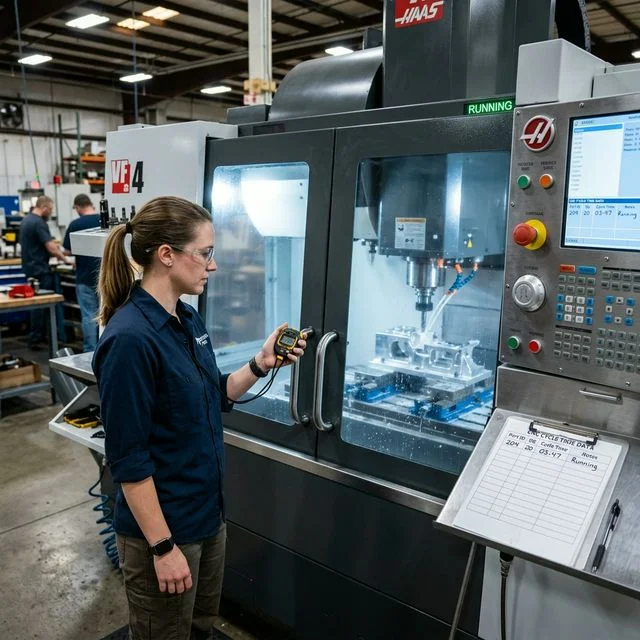
How to Calculate Machining Time for Milling
Milling calculations require knowing your Feed Rate. Feed rate isn't guessed; it's derived from spindle speed (RPM), the number of cutting flutes on your end mill, and the desired chip load per tooth.
Feed Rate (IPM) = RPM × Flutes × Chip Load
Example: You are milling a 20-inch slot with a 4-flute end mill. Your RPM is 4,000 and your chip load is 0.002".
Feed Rate = 4,000 × 4 × 0.002 = 32 IPM.
Machining Time = 20" ÷ 32 IPM = 0.625 minutes (37.5 seconds).
How to Estimate Machining Time for Turning
For CNC lathes, "Feed Rate" is typically programmed in Feed per Revolution (IPR or mm/rev). The mathematical premise is identical, just translated to rotational physics.
Time = Length ÷ (RPM × Feed Per Rev)
Example: Turning a 100mm shaft at 1,500 RPM with a 0.2mm/rev feed rate.
Table Feed = 1,500 × 0.2 = 300 mm/min.
Machining Time = 100 ÷ 300 = 0.33 minutes.
Use the turning cycle-time support guide when feed per revolution, CSS/RPM, pass count, and chuck handling dominate the estimate, and use the drilling cycle-time support guide when peck/retract behavior and hole count are the real source of error.
CNC Turning Cycle Time Calculation Formula
When the query is specifically about a turning cycle time calculator or CNC lathe cycle time calculation, start with the same structure but model each pass and non-cutting event independently:
Turning Time = Length / (RPM x Feed per Rev)
Then add approach distance, retract distance, tool indexing, chuck open-close, and any dwell or gauging logic to move from machining time to full cycle time.
The Hidden Trap: Cycle Time vs. Machining Time
A common mistake in quoting is confusing machining time with true cycle time. The formulas above only account for the time the tool spends physically cutting metal. They do not include:
- Rapid approach and retract movements (Air Cutting)
- Tool change times (value depends on machine, magazine, and sequence)
- Part loading and unloading (Handling time)
Automating the Math
Calculating L ÷ F manually for a complex 3D toolpath with 12 tool changes is practically impossible. While CAM software provides accurate times post-programming, you often need rapid cycle time estimates during the quoting phase.
To solve this, we built a dedicated tool that adds non-cutting factors (rapid motion, tool changes, setup overhead) on top of cutting formulas. Use your measured machine data to calibrate those factors.
Multi-Pass Machining: Where Estimations Get Complex
Most real-world parts require multiple passes at different depths of cut (DOC). The total cutting time is the sum of all individual pass times. Understanding approach and overtravel distances is critical for accurate estimates.
Face Milling Time (with Approach Distance)
When face milling, the cutter must travel beyond the workpiece length to fully engage and clear. The effective cut length includes:
Effective Length = Part Length + Approach + Overtravel
- Approach: Program-defined distance to achieve stable engagement before effective cutting.
- Overtravel: Program-defined distance to clear edge conditions and protect finish quality.
Example: Face milling a 10" × 4" block with a 3" face mill at 40 IPM.
Approach = 1.5" (50% of 3"), Overtravel = 0.5" (17% of 3").
Passes across width = 4" ÷ 2.1" (70% stepover of 3") = 2 passes.
Effective length per pass = 10 + 1.5 + 0.5 = 12".
Time = (12" × 2 passes) ÷ 40 IPM = 0.6 min (36 seconds).
Multi-Depth Roughing Calculation
When material removal requires multiple depth passes, calculate each pass separately, then sum:
Total Time = Σ (Length_pass / Feed_pass)
Roughing passes often run at higher feed rates (aggressive chip load) while finish passes use lower feeds for surface quality. Each pass may have a different feed rate.
Real-World Worked Examples
Example 1: Simple Slot (Single Pass)
Job: Mill a 6" slot, 0.25" deep, using a 1/2" 4-flute carbide end mill in 6061 Aluminum.
| SFM (supplier-recommended starting value) | 1,000 |
| RPM = (1000 × 3.82) / 0.5 | 7,640 |
| Chip Load | 0.003" |
| Feed Rate = 7640 × 4 × 0.003 | 91.7 IPM |
| Cutting Time = 6" / 91.7 | 3.9 seconds |
Example 2: Pocket with Multiple Passes
Job: Mill a 4" × 3" pocket, 0.75" deep in 4140 Steel. Using 1/2" 4-flute, DOC = 0.25".
| Depth passes (0.75 / 0.25) | 3 passes |
| Lateral passes per layer (3" / 0.35" stepover) | ~9 passes |
| Total toolpath length per layer | ~36" |
| SFM (supplier-recommended start), RPM result | 3,056 RPM |
| Feed = 3056 × 4 × 0.002 | 24.4 IPM |
| Time per layer = 36 / 24.4 | 1.48 min |
| Total roughing time = 1.48 × 3 | 4.43 min |
Then add finishing time from your finishing strategy and measured feed conditions.
Example 3: Drilling Operations
Job: Drill 8 holes, #7 drill (0.201"), 0.75" deep in Mild Steel.
| SFM (supplier-recommended start) | 90 |
| RPM = (90 × 3.82) / 0.201 | 1,710 |
| Feed per Rev (IPR) | 0.005" |
| Time per hole = 0.75 / (1710 × 0.005) | 5.3 sec |
| Total for 8 holes | 42.1 sec |
Add positioning and retract overhead from your control and cycle pattern to obtain full-cycle estimate.
Frequently Asked Questions
How accurate are manual machining time estimates?
Manual estimates are useful for early quoting, but final accuracy depends on how well you model non-cutting events and machine dynamics. Build an internal error band from historical jobs rather than relying on universal percentages.
What is the difference between cutting time and cycle time?
Cutting time is tool-engaged time only (T = L/F). Cycle time includes cutting plus tool changes, rapids, state transitions, handling, and inspection activities. The relationship between the two should be calibrated by your own production data.
How do I account for multiple operations in a quote?
Calculate each operation separately (face mill, drill, tap, chamfer, etc.), sum cutting times, then add calibrated overhead lines: tool changes, rapid moves, handling, probing/inspection, and setup verification. Our Machining Time Calculator automates this workflow.
Related Guides
Use machining time estimation for quote-stage job time, then use machining time reduction only after the baseline cycle is measured.